If you teach in a Rajasthan government school, you probably already know how much time you spend chasing paperwork for leave, transfers, or salary slips. The Shala Darpan Staff Window changes that, it puts everything in one place so you can handle most tasks yourself online. No more running to the block office for basic updates. This portal is built specifically for teachers and school staff, and once you get your login set up, you can check your service book, apply for leave, see transfer schedules, and much more, all from your phone or computer. The whole idea is to make daily administrative work simpler for people actually working in schools.
Direct Login Link (Official Website)
The only safe place to log in is the official government site rajshaladarpan.nic.in. Never click random links from WhatsApp groups or unofficial websites, many fake sites look similar and try to steal your details. When you open the official page, look for the Staff Window option usually on the top menu or right side. Always check the web address starts with rajshaladarpan.nic.in and has the government lock symbol. That way you know your information stays secure.
What is Shala Darpan Staff Window?
Think of the Staff Window as your personal dashboard inside the bigger Shala Darpan portal. It is the section reserved only for teachers and non-teaching staff in Rajasthan government schools. Once you log in, you get access to your own records – service book, posting details, leave balance, salary information, everything tied to your employment. Regular citizens or students use different sections, but this one is strictly for staff members. The government set it up so teachers do not have to depend on office clerks for routine information or applications.
Shala Darpan Staff Window Login Process
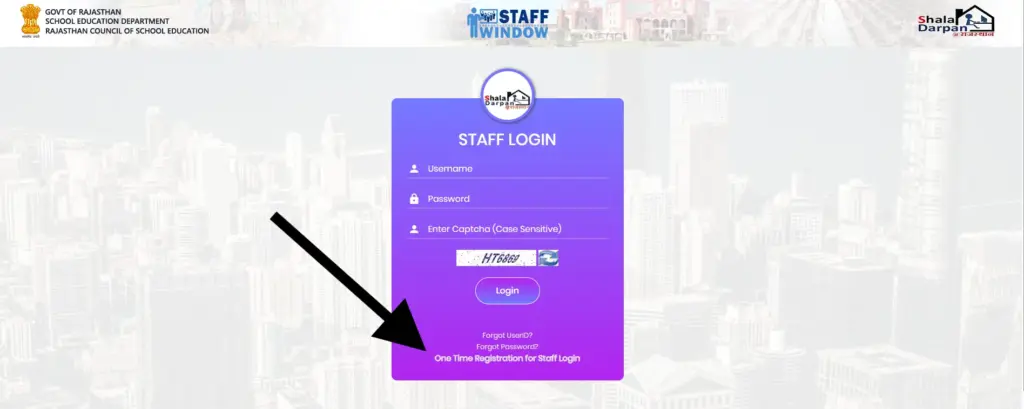
Logging in is pretty straightforward once you have your credentials ready. You go to the official site rajshaladarpan.nic.in, click on Staff Window, then enter your username (usually your Staff NIC-SD ID turned into login ID) and password. There is always a captcha to fill, just type the letters you see and hit login. If everything matches, you land straight on your personal dashboard. Most teachers use this daily during school hours to check updates or submit applications quickly.
Staff Registration Process (New User)
If you are logging in for the first time or your account is not yet created, you need to register once. The process starts from the same Staff Window page. You click on registration, enter your Staff NIC-SD ID or employee details, verify with mobile OTP, and set up your username and password. It takes maybe ten minutes if you have all details ready. After registration finishes, you can log in normally from then on.
Required Details for Registration
You need a few basic things ready before starting registration. First is your Staff NIC-SD ID or employee ID from your appointment letter. You also need the registered mobile number that is already in Shala Darpan records, because OTP goes there. Date of birth must match exactly, and you will need your School NIC-SD ID to link everything properly. Keep these details handy so the process goes smoothly without getting stuck halfway.
How to Find Staff NIC-SD ID?
Finding your Staff NIC-SD ID is easier than it sounds. Go to the Staff Window page on rajshaladarpan.nic.in and look for “Know Staff NIC-SD ID” option. Enter your School NIC-SD ID, select your name from the list that appears, fill the captcha, and click go. Your personal Staff NIC-SD ID shows up immediately along with basic details like post and subject. Most teachers find it this way without any trouble.
What is School NIC-SD ID?
Every government school in Rajasthan has a unique School NIC-SD ID assigned by the education department. It works like a permanent code for the school, similar to how each teacher has a Staff NIC-SD ID. You need the school code for almost every staff-related task on the portal – registration, finding staff details, applying for transfers, everything links back to it. Schools usually display it on notice boards or keep it in office records.
Services Available in Staff Window
Once you are inside the Staff Window, you get a long list of useful services designed specifically for teachers. You can check personal details, apply for different types of leave, see transfer schedules, download pay slips, update profile information, and track award applications. Many teachers use it regularly for quick tasks that used to take days through paper files. The portal keeps getting new features based on what staff actually need.
- Leave Application & Approval
- Service Book & Profile Update
- Transfer Details & Posting Status
- Salary & Pay Slip Information
- Promotion & Experience Certificate
Frequently Asked Questions
Official Shala Darpan Portal
The only official address is rajshaladarpan.rajasthan.gov.in. Bookmark this link and always access Staff Window from here. Avoid any other websites claiming to be Shala Darpan.
Rajasthan Education Department Website
For broader department updates and circulars, visit education.rajasthan.gov.in. Many important notifications and forms are available there alongside Shala Darpan.
Staff Helpdesk / Contact Details
For technical issues or account problems, contact the helpline numbers 0141-2700872 or 0141-2711964.
The office is located at Shiksha Sankul, JLN Marg, Jaipur. Staff can also reach block or district education officers for assistance.